Virtual Datacenters (vDC)
Virtual Datacenters are available in the Enterprise edition and are designed for MSP, IaaS, and multi-tenant platform use cases.
A virtual datacenter (vDC) is a self-service infrastructure boundary for a tenant. It combines Proxmox resource pools, placement rules, quotas, SDN networks, IPAM, and backup isolation into one tenant-facing workspace.
Providers keep a global view of the underlying Proxmox clusters, while tenants work from My vDC with only the resources assigned to them.
A vDC slices a shared cluster. If instead a tenant should own one or more entire clusters, use the MSP operating model described in Multi-Tenancy. The two models can coexist on the same instance.
What a vDC Contains
| Component | Purpose |
|---|---|
| Resource pool | Limits tenant visibility and placement to the tenant's assigned Proxmox pool |
| Quotas | Controls CPU, RAM, storage, snapshot, and backup consumption |
| Networks | Assigns SDN VNets, subnets, shared bridges, VLAN pools, and IP ranges to the tenant |
| IPAM | Reserves IP and MAC addresses during deploy, clone, restore, and network edits |
| Storage policies | Caps disk IOPS and bandwidth on a given storage, with an optional quota for that tier |
| ISO library | Grants read-only ISO storages, with an optional upload area of the tenant's own |
| Compute policy | Constrains the CPU models the tenant may pick, and whether advanced CPU settings are exposed |
| VXLAN transport | How the vDC's SDN zone reaches its peers: the cluster network, an explicit peer list, or a dedicated transport segment |
| Backups | Binds the vDC to a dedicated PBS namespace, token, ACL, and PVE storage target |
| Datacenter assignment | Links the vDC to the physical datacenter used for Green IT metrics |
The provider screen, Settings > Virtual Datacenters, carries four tabs: Virtual Datacenters, Storage policies, Tenant networks and Help. The vDC dialog itself is split into General, Storage, Compute, Network and Quotas; edits made on one tab survive a switch to another, and a section that needs a cluster says "Select a connection first to configure this section." until one is picked.
Tenant Cockpit
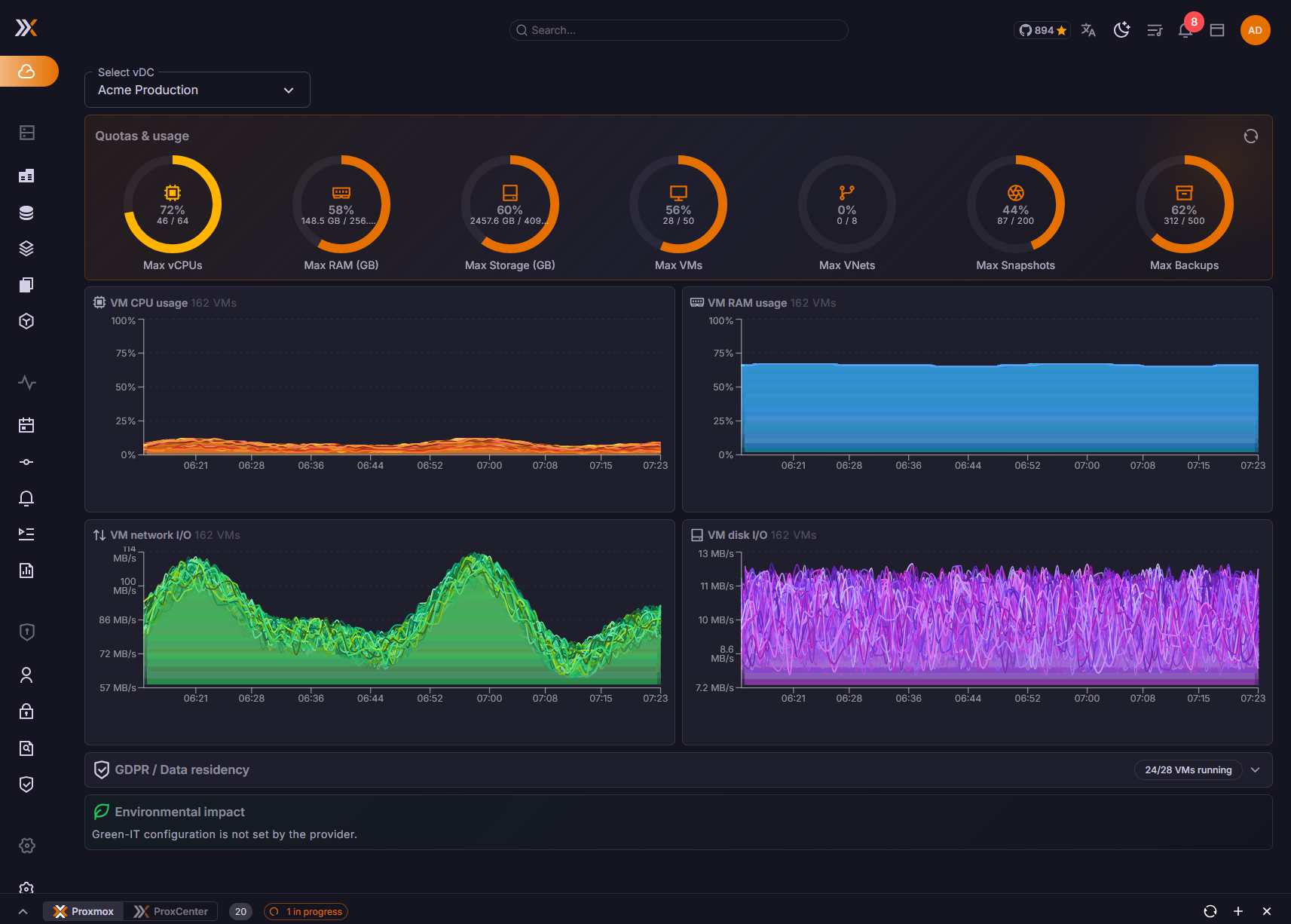
The My vDC page gives tenant users a live view of their own capacity and services:
- Host and VM consumption metrics
- CPU, RAM, storage, snapshot, and backup quota usage
- Datacenter map and placement context
- Green IT KPIs for energy, cost, and CO2 estimates
- Quick access to deploy, backup, restore, and manage assigned workloads
Tenant users do not need access to provider-wide settings or raw cluster administration to consume their allocated infrastructure.
Creating a vDC
Provider administrators create vDCs from the tenant management workflow:
- Create or select the tenant.
- Assign the tenant to a Proxmox pool or create the pool during setup.
- Define CPU, RAM, storage, snapshot, and backup quotas.
- Assign allowed nodes, storages, bridges, SDN VNets, and subnets.
- Optionally dedicate one or more VLAN pools to the vDC, so its users can build their own VLAN networks.
- Optionally attach one or more storage policies, each with its own tier quota.
- Bind a PBS namespace automatically or configure it manually.
- Assign the vDC to a datacenter for Green IT calculations.
- Optionally set a compute policy and an ISO library on the matching tabs.
- Invite tenant users and grant the roles they need.
General also carries an optional SDN Zone ID: up to 8 lowercase alphanumeric characters starting with a letter, unique on the cluster. Left empty it is generated, as it always was; set it when the zone name has to be predictable for something outside ProxCenter.
Use one vDC per customer, project, or isolated environment. A tenant can have multiple users, but each user's visibility remains constrained by tenant and vDC scope.
Several vDCs per Tenant
A tenant is not limited to a single vDC. It can hold one vDC per cluster, so a tenant that consumes two shared clusters ends up with one vDC on each. A second vDC for the same tenant on the same cluster is rejected.
To add another vDC, run the creation workflow again from Settings > Virtual Datacenters and pick a different cluster. Two constraints apply to that choice:
- The cluster picker only offers clusters on which this tenant does not already have a vDC. Once the tenant holds one on every available cluster, the dialog says so instead of offering an empty list.
- Only clusters that are still in the provider pool can be sliced. A connection owned by an MSP tenant is not offered, because a cluster is either handed over whole to an MSP tenant or shared through vDCs, never both.
The vDC Name is optional. Left empty, it is derived from the tenant and cluster names. The slug is derived from the same pair and is not typed by hand. Each vDC keeps its own slug, its own PVE pool, its own quotas, its own networks, and its own backup binding, so the vDCs of one tenant stay independent of each other.
The effective ceiling is therefore the number of provider-pool clusters. There is no numeric or licence cap on the number of vDCs a tenant may hold.
A tenant with a single vDC behaves exactly as it did before. Everything described in the next section appears only from the second vDC onward.
Switching Between vDCs
A tenant that owns several vDCs gets a vDC switcher in the top navigation bar. It lists:
- All vDCs, the aggregated view over every vDC of the tenant. This is the default.
- One entry per enabled vDC.
Picking an entry sets the vDC context for the whole interface and reloads it. The context is kept in a browser cookie, so it survives navigation, reloads, and new tabs until it is changed back. All vDCs clears it.
The switcher is shown only to vDC (IaaS) tenants with at least two enabled vDCs. It is absent from the provider view and from MSP tenants, and a tenant with a single vDC does not get it either. A provider administrator who is also a member of a vDC tenant does see it once they switch into that tenant, because the decision follows the active tenant, not the account's role.
Once a vDC is selected, the server narrows the following to that vDC alone:
| Area | Narrowed to the selected vDC |
|---|---|
| Inventory | The tree roots, the guest list, and the network and backup sections |
| Guests | VM and container lists, which also carry a vDC column and a vDC chip on the detail view |
| Backups | PBS archives, datastores, PBS jobs, and backup trends |
| Operations | Alerts, changes, running tasks, orchestrator jobs, and rolling updates |
| Deploy and restore | The default target vDC in the deployment wizard and in the tenant restore dialog |
| My vDC | Opens directly on that vDC's dashboard instead of the vDC list |
The vDC context is a view filter, not a permission boundary. Authorization still evaluates the union of every vDC the user is entitled to, so narrowing the view neither grants nor removes any right. A context pointing at a vDC that has since been disabled or deleted silently falls back to All vDCs.
Because the context only shapes lists, a direct link to a single object keeps working while a different vDC is selected: opening a connection, an alert, or a guest's backups resolves against the tenant's full set of vDCs. Read-only API tokens ignore the context entirely and always answer with the tenant's full scope.
While a single vDC is selected, the per-vDC affordances that only make sense in the aggregated view are hidden: the vDC column in the guest lists, the per-vDC grouping in the inventory tree, and the vDC selector in the deploy and restore dialogs. The header switcher is then the single control over context.
When a tenant has more than one vDC, My vDC opens on one card per vDC, with that vDC's node, storage, and quota summary. Clicking a card selects it as the context, exactly like using the switcher in the header.
Self-Service Deployment
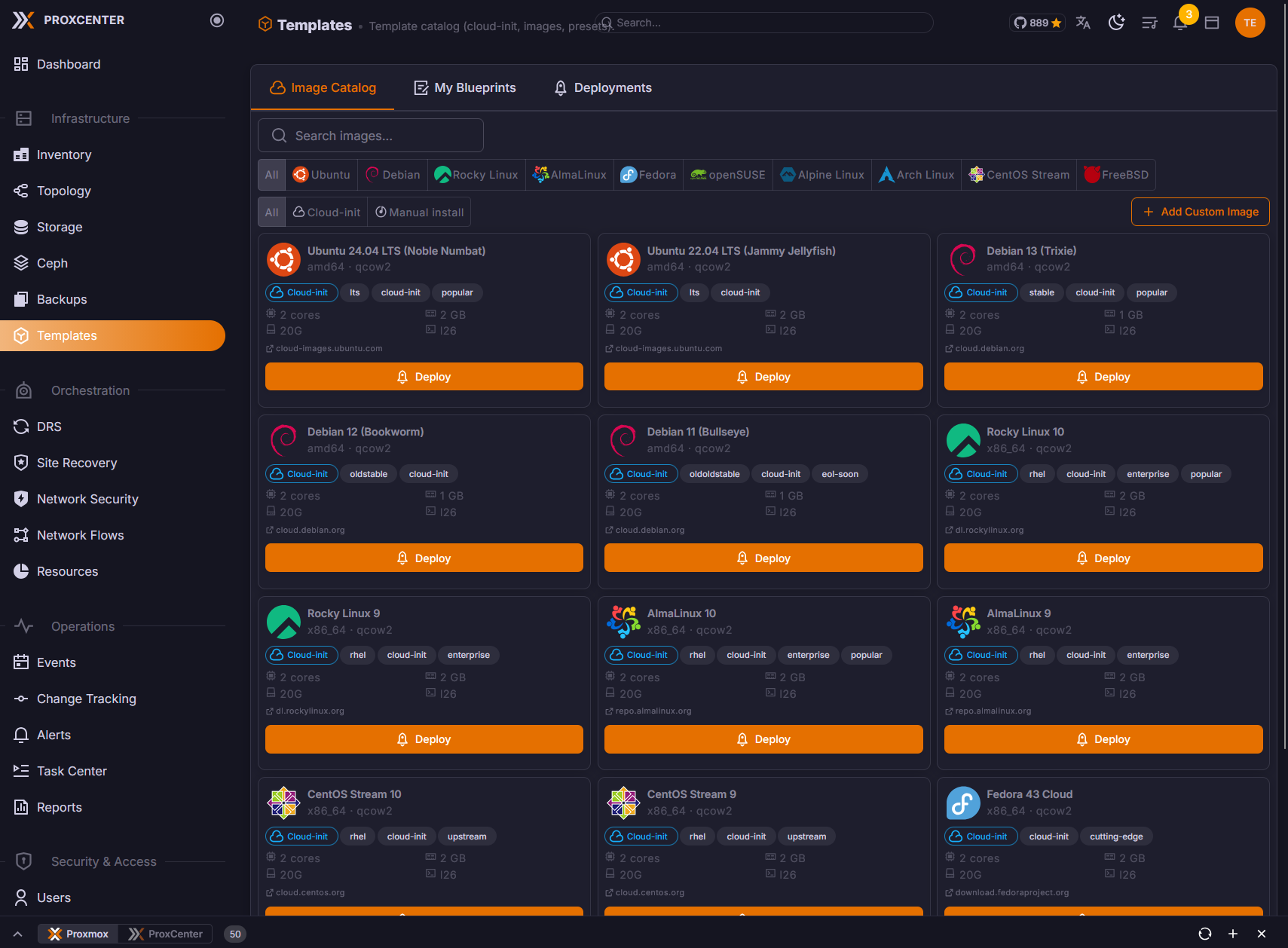
Tenant users can deploy workloads from a guided wizard. Supported sources include:
- VM templates
- ISO-based installation
- Clone from an allowed source VM or template
- Restore from a tenant-visible PBS backup
Every deployment step is validated server-side. ProxCenter rejects resources outside the tenant's vDC, including foreign storages, nodes, bridges, VNets, subnets, pools, and backup namespaces. Quotas are enforced before the request is sent to Proxmox.
Storage Policies and QoS Tiers
A storage policy is a named QoS profile the provider declares on one storage of one cluster. It carries up to four caps -- read IOPS, write IOPS, read MBps, write MBps -- and a vDC attaches it with a quota of its own, which turns the storage into a sellable tier. Policies are managed from Settings > Virtual Datacenters > Storage policies, with one card per Proxmox connection. (Enterprise)
Declaring a policy
Open the card of the cluster that owns the storage and use the + button:
- Name, unique on that cluster, up to 64 characters.
- Storage. The picker only offers storages that can back a vDC disk: shared, enabled, and advertising
imagesorrootdircontent. The choice is re-validated against the cluster when you save. - IOPS (read), IOPS (write), MBps (read), MBps (write). Each is a positive integer, and an empty field means no limit on that axis. The table renders an empty cap as Unlimited.
- An optional Description.
| Rule | Detail |
|---|---|
| One policy per storage | A storage carries at most one policy per cluster, because the tier quota is metered per storage. The picker greys out a storage that is already governed and names the policy holding it |
| Shared storage only | A local storage is refused: a guest that lands on one cannot live-migrate, which breaks the placement promise of a vDC |
| Provider-pool clusters only | A cluster handed over whole to an MSP tenant cannot carry a storage policy. Declare policies on the clusters you slice through vDCs |
| Storage frozen once assigned | While at least one vDC has the policy attached, the Storage field is locked. Changing it would silently drop the old storage out of every assigned vDC's allow-list. Cap edits stay available |
| Delete blocked while assigned | Deleting a policy that a vDC still uses is refused, and the delete button carries the number of vDCs holding it |
The Storage policies view lists a card for every Proxmox connection, including clusters owned by an MSP tenant. Those clusters cannot carry a policy, and a create attempted there fails with a server error rather than a clear message. Only declare policies on clusters you slice through vDCs.
Attaching a policy to a vDC
In the vDC dialog, the Storage policies section lists the attachments. Attach a policy adds a row: pick the policy, then optionally a Quota (GB) for that tier. Leave the quota empty and the tier only stamps its caps, with consumption still counted by the vDC's global storage quota.
Detaching is guarded: if the vDC still holds volumes on that policy's storage, the save is refused and the message names the VMIDs concerned. When the cluster cannot be reached, the check is skipped rather than blocking the edit, so an unreachable cluster never locks the provider out of the vDC form.
The vDC list carries a Storage policies column showing, per attachment, the policy name, its storage, and its quota.
What the caps apply to
Caps are stamped on the disk line itself, so Proxmox enforces them. They are written on every path a vDC tenant uses to put a VM disk on a governed storage:
| Operation | Caps stamped |
|---|---|
| Creating a VM | Yes, on save |
| Adding, editing, or importing a disk from the guest Hardware tab | Yes, on save. An import-from disk is stamped like any other |
| Deploying from the templates wizard | Yes, on the boot disk |
| Cloning a guest | Yes, once the clone task finishes |
| Restoring a backup | Yes, once the restore task finishes |
| Rolling back a snapshot | Yes, once the rollback task finishes |
| Moving a disk to another storage | Yes, with the target storage's caps, once the move finishes |
Stamping applies to QEMU VM data disks (scsiN, virtioN, ideN, sataN) belonging to a vDC (IaaS) tenant. Containers are not stamped: an LXC mount point uses a different config shape and carries no QoS options. EFI and TPM state disks are validated against the vDC's allowed storages but take no caps. Guests of the provider tenant and of MSP tenants are never touched.
Any bandwidth or IOPS option the tenant sets by hand is stripped and replaced by the policy's values on every save, so a tenant cannot buy a slow tier and raise its own ceiling. The Edit disk dialog reflects that: on a governed storage a line names the policy that owns the caps, and the four bandwidth fields below it are read-only, prefilled with the policy's values.
The tier quota and how usage is measured
Per-tier usage is read from the storage's own content listing, restricted to the guests in the vDC's Proxmox pool. That is what PVE actually allocated, not what the tenant declared, so an import-from allocation costs its real source size rather than the token size typed in the form.
The tier quota is enforced server-side before the request reaches Proxmox on: creating a guest, adding a disk, resizing a disk, moving a disk onto the tier, cloning, and deploying from the templates wizard. A restore is not metered against the quota, although its disks are still stamped with the tier caps.
Tenants see the tier two ways:
- My vDC adds a Storage tiers block under the quota donuts, with one bar per attached policy that carries a quota. The bar turns red past 90 %, and a tier already over its quota is flagged with a warning icon next to the used / quota figures.
- The templates deploy wizard adds a fifth donut for the tier of the selected storage and blocks Next while the projected disk would overflow it, instead of letting the deployment fail on its last step.
The Create VM and Create Container dialogs show the four global quota donuts but not the tier axis. A request that would overflow a tier is still refused by the server, with the policy name and the used / quota figures in the error.
Bringing existing disks under a policy
Saving a policy after changing one of the four caps re-stamps every existing disk on that storage, across every VM of every vDC the policy is attached to. The dialog switches to a progress view for the duration: a live counter of VMs processed, one line per VM with the disk keys that changed, and a closing summary of disks updated, unchanged, and in error. Close stays disabled until the run ends.
Two limits are worth knowing before you plan a migration onto tiers:
- The run is triggered by a cap change only. Creating a policy, attaching an existing one to a new vDC, or saving a rename does not visit any disk.
- Only QEMU VMs in the pools of the vDCs the policy is attached to are visited. A policy attached to no vDC has nothing to re-stamp.
Governed disks and drift
Expanding a policy row lists every VM that currently holds a disk on that storage, with one chip per disk in the form scsi1 · 100/100 · 10/10M: the disk key, then read/write IOPS, then read/write MBps. A missing cap renders as a dash.
A chip in warning colour means the disk has drifted: its live caps no longer match the policy. That happens when a cap was changed while a VM could not be reached, or when someone edited the drive line straight in Proxmox. Drift is cleared by the next re-stamp run, which only a cap change triggers. The list is fetched when the row is first expanded and refreshed after a run, and a VM whose config could not be read is shown as an error rather than dropped.
Compute Policy
A vDC can constrain the CPU models its tenant may pick, on the Compute tab of the vDC dialog, under Compute policy: "Constrain the CPU models tenants may choose and whether advanced CPU settings are exposed. Templates keep the model the provider gave them." (Enterprise)
CPU models takes one of three values:
| Mode | What it offers the tenant |
|---|---|
| Unrestricted | Every built-in and custom model, as before. This is the default |
| Custom models only | Only the models defined in the cluster's cpu-models.conf. A model added there later appears without any change to the vDC. The field says how many the cluster currently defines |
| Selected models | An explicit list, picked in Allowed models. This is the mode for tiered offers, where a standard vDC must not reach the premium model |
Two settings sit beside it:
- Default model for new VMs, which the server injects when a tenant creates a guest without naming one. Left on Automatic, the first allowed model is used. It exists because Proxmox's own default is
kvm64, which is rarely inside a curated list. - Advanced CPU settings, on by default. Switched off, "tenants pick a model and a core count only: NUMA, extra CPU flags, CPU limit and units are hidden and refused."
What the policy applies to
The policy is enforced server-side and for tenant callers only, on the three paths a CPU model can be set from:
| Path | Behaviour |
|---|---|
| Editing a guest's configuration | A model change outside the allowed set is refused: "CPU model ... is not allowed by the vDC compute policy. Allowed models: ...". With advanced settings off, writing, deleting or reverting numa, cpulimit, cpuunits or a CPU flags= is refused too |
| Creating a guest | A request with no CPU model gets the vDC default rather than Proxmox's kvm64. An allowed set that is empty on this cluster is refused outright |
| Deploying from the templates wizard | The wizard has no CPU picker and always submits host, so a model outside the set is replaced by the vDC default instead of refusing the deployment. Only the advanced part can still refuse. A blueprint owned by the provider keeps the model the provider gave it |
The governing rule everywhere: a guest keeps the model it already has, even when that model is outside the set. Only a change has to land inside it, so tightening a policy never breaks a running guest.
The interface follows the same list. The CPU model select of the Hardware tab and of the Create VM wizard is filtered for a tenant, the advanced controls are hidden when they are disabled, and the vDC default is preselected, so a tenant is not offered a model the server would refuse.
ISO Library
A vDC can be granted read-only ISO storages, on the Storage tab of the vDC dialog under ISO library: "Grant read-only ISO storages to this vDC. Tenants can mount any ISO of the provider catalogue on a CD/DVD drive, but cannot upload, delete, or place disks there." (Enterprise)
Tick one storage per catalogue you want that vDC to reach; each is annotated as shared or per node, and the list holds every storage on the cluster that advertises ISO content. Use a share replicated on every node, or one storage per catalogue tier.
A storage granted this way is never a write target. Uploads, deletions, data disks, backups, clones, disk moves, restores and deployments onto it are all refused with "This storage is a read-only ISO library". A storage the vDC reaches only through a library grant lists its ISO content and nothing else, and only on the vDC's own nodes.
Letting a tenant upload its own ISOs
Each granted storage carries an Allow tenant uploads switch: "Tenants may upload and delete their own files there, named custom-tenant-...; the provider catalogue and other tenants' files stay untouchable. Not a disk, backup or clone target."
Proxmox keeps no ownership metadata on an ISO, so ownership is derived from the file name:
| File name | Who sees it, who may change it |
|---|---|
No custom- prefix | The provider catalogue. Visible to every vDC granted the storage, writable by none of them |
custom-<tenant slug>-... | That tenant's own file. Visible and deletable by its owner alone |
| Any other prefix | Nobody's: hidden, and never writable |
A tenant upload is namespaced server-side, so the tenant types an ordinary file name and ProxCenter prefixes it. A name that would land in another tenant's namespace is refused and says so, and only iso content is accepted. The same ownership rule guards CD-ROM mounts, so a hand-crafted volume id cannot mount another tenant's upload. Slug resolution takes the longest matching tenant, so custom-acme-prod-x.iso belongs to acme-prod and never to acme.
Because a vDC tenant has no storage browser in its inventory, the CD/DVD dialogs carry the controls instead: an Upload ISO button, shown whenever the caller may write to the selected storage, with its progress, and a Delete this ISO action whose confirmation warns that "Guests still referencing it will fail to boot from it."
Network and IPAM
Each vDC can receive dedicated SDN VNets and subnets. ProxCenter tracks IP and MAC reservations so tenant deployments remain consistent even when VMs are cloned, restored, or edited later. A vDC that also holds VLAN pools lets its users build VLAN-backed networks themselves, described in Tenant VLAN Networks below.
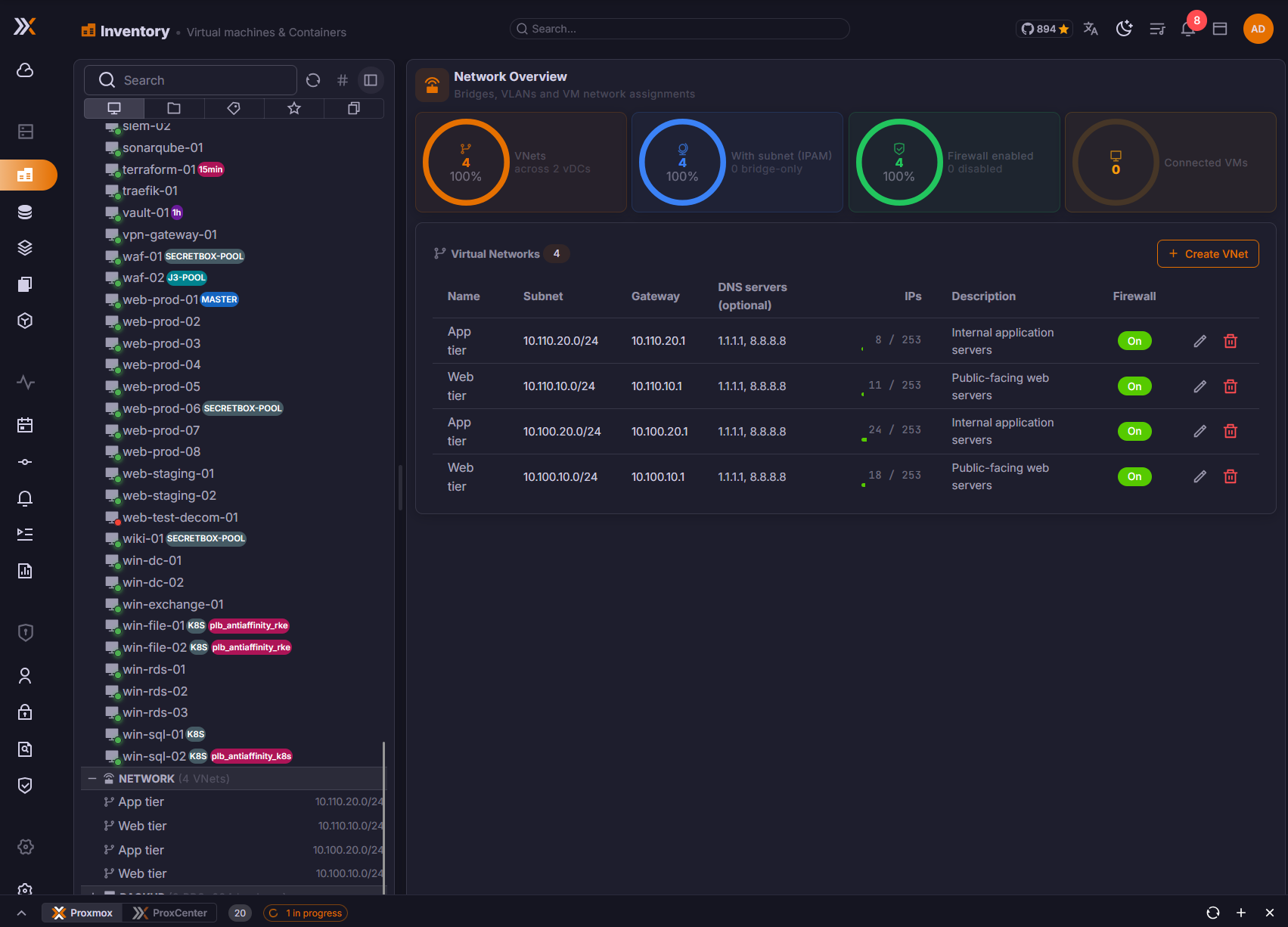
IPAM handles:
- Automatic IP reservation during deployment
- Automatic MAC reservation for new network interfaces
- Reservation updates when VM network configuration changes
- Reconciliation when a VM is created externally in the tenant's Proxmox pool
A network created with Addressing managed outside ProxCenter is deliberately left out of IPAM: its CIDR and gateway stay documentation, and no address is reserved or handed out at deploy time.
If operators create or move VMs directly in Proxmox, make sure the VM is placed in the correct tenant pool. ProxCenter reconciles tenant pool membership, but resources outside the pool remain outside the tenant vDC.
VXLAN Transport
A vDC's own networks are VXLAN: the vDC owns an SDN zone on the cluster and ProxCenter allocates the VNI. How that zone reaches its peers is configurable per vDC, on the Network tab of the vDC dialog under VXLAN transport: "How this vDC's VXLAN zone reaches its peers. Saving the vDC rewrites the zone on Proxmox and applies the SDN configuration when peers or MTU change." (Enterprise)
Transport mode takes one of three values:
| Mode | Where the peers come from | What ProxCenter writes on the nodes |
|---|---|---|
| Cluster network | The cluster node addresses, read when the zone is created. Use Sync zone after a node joins | Nothing: the overlay follows the management network and its MTU. This is the default |
| Peer list | Every peer address you type. Endpoints outside the cluster are accepted | Nothing. An address that exists nowhere makes Proxmox fall back to the route it would take, on another network |
| Transport network | The node addresses of a dedicated VLAN segment, plus any additional endpoint | The VLAN interface on every listed node, then a network reload on that node and an SDN apply |
A diagram under the picker is drawn from the form itself, so you see which node contributes which address, which peers belong to no node, and which underlay carries the overlay before you save.
Fields
| Field | Applies to | Rule |
|---|---|---|
| Peer addresses | Peer list | One IPv4 or IPv6 address per line or comma separated. At least one |
| Additional peers | Transport network | Endpoints on the segment that are not cluster nodes: tenant routers ingesting the VXLAN stream, hardware VTEPs, another cluster |
| Zone MTU (VNets) | Every mode | The MTU of the tenant VNets. Underlay MTU minus 50, so 1450 for a 1500-byte underlay and 8950 for jumbo frames. An integer between 1280 and 9000 |
| VLAN ID | Transport network | 1 to 4094 |
| Underlay device | Transport network | The parent interface the VLAN is built on. device.vlan must be at most 15 characters, which is the kernel's interface-name limit |
| Segment (CIDR) | Transport network | The segment the node addresses live in |
| Node addresses on the segment | Transport network | One address per node, each inside the segment and each used once. A Fill sequentially helper allocates them in order. A node left without an address is a warning, not a refusal: Proxmox accepts it, and it simply receives no tenant traffic |
Peers and MTU reach Proxmox before anything is written to the database, so a body Proxmox refuses leaves the stored vDC untouched, and a save that changes neither peers nor MTU never touches Proxmox at all.
Provisioning the transport network
Creating the VLAN interfaces is a separate, explicit action, never a side effect of saving: Provision on nodes, with the warning that it "Creates or updates the VLAN interface on each listed node, then reloads that node's network. This applies every pending network change of the node."
Per node it creates a VLAN interface named device.vlan, with the node's address on the segment, autostart on, a comment naming the vDC, and an MTU of the zone MTU plus the 50 bytes of VXLAN overhead. A network reload follows on each node, then one SDN apply at the end, which is what makes the zone pick up the new addresses. The run is idempotent and reports per node whether the interface was created, updated, already correct, or in error, and the panel then shows each node as provisioned, not provisioned, different from what is expected, or unreachable.
Sync zone and Provision on nodes are both disabled while the form differs from what is stored: save the vDC first. Sync zone rewrites the zone from the stored transport and recreates it if it has been deleted on the Proxmox side, and the panel next to it compares what Proxmox actually runs, staged changes included, against what the transport asks for: In sync, Out of sync, Zone not found on Proxmox or Pending apply.
Deleting a vDC deletes its zone and its networks but leaves the VLAN interfaces in place on the nodes. They may be shared with another vDC, and removing a node's interface is a change to the node's network configuration, not to a tenant's.
Two vDCs on one segment
Two vDCs on the same cluster may share a transport segment, but only with the same definition. A disagreement is refused before anything is written, on either side, and the message names the vDC already holding it. Five disagreements are caught: a different CIDR on the same interface, a different zone MTU on the same interface, one node given two addresses, one address given to two nodes, and one segment reached through two interfaces.
This is a transport for L2 segments. EVPN and the routing that comes with it are out of scope.
Tenant VLAN Networks
By default a vDC's networks are VXLAN: the vDC owns an SDN zone and ProxCenter allocates the VNI, over the transport described in VXLAN Transport above. A provider can additionally dedicate one or more VLAN pools to a vDC, after which the tenant builds VLAN-backed networks itself, self-service, with the tag taken from its own ranges. (Enterprise)
Dedicating VLAN pools (provider)
In Settings > Virtual Datacenters, edit the vDC and use the VLAN pools section. A range is a Bridge, a First VLAN ID, and a Last VLAN ID; the + button on the section header adds another.
| Rule | Detail |
|---|---|
| Bridges offered | The cluster's physical bridges, Linux and OVS alike, deduplicated across nodes. SDN VNet names are excluded; a bridge already used as the uplink of an SDN zone stays available for pools |
| VLAN awareness | A bridge that does not report VLAN awareness is still selectable, with a warning under the field that tagged traffic may not pass. Fix it on the Proxmox side before handing the range to a customer |
| Bounds | 1 to 4094. Proxmox itself accepts higher values, but 0 and 4095 are reserved by 802.1Q, so ProxCenter stops at 4094. The first ID must be lower than or equal to the last |
| No overlap | Two ranges of the same vDC may not overlap on the same bridge, and neither may a range of another vDC on the same cluster and bridge. The error names the other vDC and its range |
| No unsafe shrink | A range cannot be narrowed below a VLAN network that already uses a tag inside it. The error names the network and the tag it holds |
Creating a VLAN network (tenant)
Tenant users create networks from Infrastructure > Inventory, in the Network view, from the Virtual Networks card and its Create VNet button.
- The Network type selector only appears when the selected vDC carries at least one VLAN pool. Without a pool the dialog behaves exactly as before and creates a VXLAN network.
- Choosing VLAN adds a Bridge picker, limited to the bridges this vDC has a pool on, and a VLAN ID field. A single bridge in the pools is selected implicitly.
- Leave VLAN ID empty and ProxCenter assigns the lowest free tag in the vDC's ranges for that bridge. The helper text spells out the ranges available.
- A tag typed outside those ranges is refused, and so is a tag already carried on that bridge, whether by another vDC's network or by a zone the provider built directly in Proxmox.
- Freed tags are reused. Unlike VXLAN VNIs, VLAN tags are a scarce, provider-bounded resource.
- A subnet with a CIDR and a gateway is mandatory on both network types. The gateway is prefilled with the first usable host of the CIDR.
The Addressing managed outside ProxCenter checkbox is offered on VLAN networks only. Ticked, the subnet stays declarative: IPAM hands out no address at deploy time and the tenant runs its own DHCP or a static plan. It is not offered on a VXLAN overlay, where ProxCenter's IPAM is the only allocator that works, so opting out would leave the network with none at all.
How VLAN networks sit on the cluster
- All VLAN networks of a cluster share one provider-owned SDN zone per bridge, created automatically the first time a tenant asks for a VLAN network on that bridge. Its name is derived from the connection and the bridge, so concurrent creations converge on the same zone.
- That shared zone is the L2 backstop: Proxmox enforces tag uniqueness inside a zone, so two vDCs racing for the same tag end in a Proxmox error rather than a shared broadcast domain.
- Deleting a vDC deletes its own networks and its own VXLAN zone. The shared VLAN zones are kept, since other vDCs may still use them and an empty zone costs nothing.
- VXLAN VNIs are allocated from 10000 upward, cluster-wide. A VLAN tag never reaches that floor, so a tag and a VNI cannot collide on the same cluster.
Tagging a shared bridge directly
A VLAN pool also widens what a tenant may write in a guest NIC. On a bridge the vDC already receives as a shared bridge, a NIC may carry tag= or trunks= values that fall inside the vDC's pools for that bridge; anything outside is refused. A pool on its own never opens a bridge the vDC does not already share, and a tag on an SDN VNet is refused outright because the VNet already carries its own.
See Network Security for the full list of checks and where they run.
Stretched Tenant Networks
One tenant holding a vDC on several clusters can be given one L2 segment carried by all of them at once: the same VNI and the same VNet on every member cluster, one shared subnet and one shared IPAM pool, so guests on different clusters sit on the same network with no routing between them. (Enterprise)
Stretched networks are created and managed by the provider, from Settings > Virtual Datacenters > Tenant networks. There is no tenant-side request flow: the tenant asks, the provider creates and attaches.
Creating one
New tenant network takes:
| Field | Rule |
|---|---|
| Name, Description | The name is unique inside the tenant |
| VNI | Left empty, a VNI free on every cluster of the tenant is allocated. Set it explicitly when something outside ProxCenter, a tenant router for instance, reads the tag. A VNI already taken names its holder |
| Zone MTU | Every member zone has to carry it. It cannot be changed once a vDC carries the network |
| Subnet (CIDR), Gateway, DNS servers | The single subnet of the whole segment |
Only tenants owning at least one enabled vDC with a VXLAN zone can hold a stretched network; otherwise the create button says so instead of opening an empty form. Once created, only the name, the description and the DNS servers can be edited: the VNI, the subnet and, as soon as a vDC carries it, the MTU are locked.
The VNI reservation is global and survives an empty network, so a cluster that joins later cannot find the VNI already in use by something else. It is checked against the VNets ProxCenter created, the live VNet tags of every cluster of the tenant, legacy zones and VLAN tags included, and every other tenant network.
Adding and removing member vDCs
Member vDCs lists the vDCs carrying the network, one chip per cluster, and Add a vDC offers only the tenant's vDCs that have a VXLAN zone on a cluster no member holds yet.
Joining creates a real VNet in that vDC's own zone, carrying the network's VNI and name, so everything that already consumes a vDC VNet keeps seeing an ordinary one. It also rewrites the zone of every member with its own peers plus the other members', which is what makes the VXLAN tunnels between the clusters meet. The same exchange happens again when a member's own transport changes or a member is removed, and Sync zones replays it on demand, reporting how many zones were rewritten and how many were already in sync.
Leaving is refused while a guest NIC still uses the local VNet, and the network cannot be deleted until the last member has left. Deleting it releases the VNI.
IPAM is shared. The network owns one canonical subnet and every member points at it, so an address is handed out once for the whole segment rather than once per cluster, across deploy, guest creation, clone and restore alike.
Checking that the underlay carries it
Test reachability has each node of a member cluster ping the transport peers of the other members over SSH. It needs at least two members, and it answers per node and per peer.
Read the result for what it is: an address that answers is routed by the underlay, which does not prove that UDP 4789 passes. One that does not answer is the usual explanation for an overlay that stays silent while both zones report themselves in sync.
What the tenant sees
In My vDC, a VNet that comes from a stretched network is badged Stretched, with the tooltip "Part of the tenant network ..., present on several clusters" and the subtitle "Managed by your provider". Editing and deleting it are disabled in the interface and refused by the server. A Stretched networks card lists each network once with the vDCs carrying it.
The vDC dialog shows the same list, read-only, on its Network tab: "Stretched networks this vDC carries. Managed from the Tenant networks tab."
Shared Bridges and Provider VNets
Beyond the networks a vDC builds for itself, a provider can hand it existing uplinks, in the vDC dialog's Network tab under Shared bridges (uplinks): "Optional: grant host bridges for WAN or management uplinks. The tenant's own networks are the VNets it creates in its SDN zone above."
Since v1.4.10 that list carries provider-managed SDN VNets next to host bridges, so a segment the provider already runs as a VNet, a WAN or a transit network, can be shared with a tenant without being rebuilt as a bridge. Each is shown with its own icon and its zone in parentheses, and ticking one prefills its Proxmox alias as the label.
What is offered, and what is not:
- A bridge used as the uplink of an SDN zone is offered as a VLAN pool bridge but not as a shared bridge, so the same segment is never offered twice under two names.
- A VNet belonging to any vDC's own zone is never offered. Only VNets the provider manages outside the vDC zones are.
In the deploy wizard, the network picker groups its entries as VNets (your vDC), Shared bridges and Cluster bridges. The VLAN tag field follows the kind of network selected: hidden on a vDC's own VNet, where the VNet already carries its tag, and editable on a shared bridge. When the vDC holds a VLAN pool on that bridge, the field states the ranges it accepts, "Allowed VLAN ranges: ...", and a bridge with no pool says so. A tag must be an integer between 1 and 4094, checked in the wizard and re-checked against the vDC's pools by the server.
Backup Isolation
Each vDC can be bound to its own Proxmox Backup Server namespace. In automatic mode, ProxCenter provisions the namespace, sub-token, ACL, and PVE storage target. Manual mode is available for operators who prefer to pre-create PBS objects or enforce stricter naming policies.
Tenant users can:
- View backups from their own PBS namespace
- Create PVE backup jobs constrained to their vDC pool
- Use a structured schedule picker for recurring jobs
- Verify and delete allowed backups
- Restore over the source VM or restore as a new VM in their vDC
Tenant Isolation
vDC scoping applies across the MSP feature set:
- Inventory shows only tenant-owned resources
- PBS backups are filtered to the tenant namespace
- PVE backup jobs are constrained to the tenant pool
- Events, tasks, alerts, and reports respect tenant boundaries
- Provider administrators can still see and operate across tenants from the provider view
Tenant users with no assigned vDC do not inherit provider visibility. They see only the features and resources explicitly granted to them.